
PetPress Data Manager
The PetPress Data Manager allows shelters to create, change, or delete animal data without the need for a back-end data source. As of version 2.2 of PetPress, you do not need any other software to show your animal data on your website.
Who Data Manager is for:
Data Manager is intended for small shelters or shelters outside North America that do not have one of the supported back-end systems.
How to access the Data Manager:
From the PetPress settings page, under “Data Source”, select “This website”.
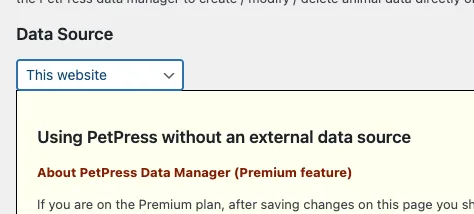
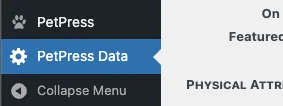
Note that to use the Data Manager, you need to have upgraded to the premium plan (there is only one paid plan). If you are on the premium plan, then after saving your changes, you should see the Data Manager menu in the left-column of your WordPress editor
How to add an animal to the database:
The first step to adding an animal is to set the animal’s species (dog, cat, etc.). The selection of species may influence which fields are available for your animal.
Once you have set the species, you can proceed with entering the animal information. You will also notice that if you already have animals defined of that species, they will be listed in the “Edit Animal” list.

The Edit Animal list will contain all of the animals of the selected species. To the right of this list is a checkbox, “Include animals that are hidden”, which you should check to see all animals of the species, not just those on the website (the concept of hidden animals allows you to remove an animal from the site without deleting it from the database).
The first line of the “Edit Animal” list is “New entry”. Leave this selected if you want to create a new animal record. (If you select an animal, you will be editing that animal record, not creating a new one.)
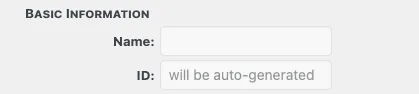
The next section contains basic information about the animal. Name is first, it is a free form text field with no particular restrictions.
Following name is the animal ID. This is not an editable field. It will be assigned when the record is first created. If you are editing an existing animal, you’ll see the ID, but you cannot edit it. IDs are unique.
The next fields are “Last intake date” and “Duration of stay”. The latter field is not editable, rather it is calculated by the intake date.

Following this are three checkboxes that affect on how the animal is displayed on the website:

- Hide: Do not show this animal on the website. The intent is for you to use this option if an animal is temporarily unavailable but may become available in the future (in which case you would un-check the box).
- On hold: This also prevents an animal from being listed if the option to hide animals “on hold” is checked in the PetPress settings.
- Featured Pet: Check this box if you want this animal to appear in the Featured Pet report.
This page is a work in progress. More information will be provided here soon. Use the contact form if you have questions about Data Manager not covered in the available documentation.