
Version 2.2.2
Version 2.2.2 was released on February 16, 2026.
=== CHANGELOG: ===
Version 2.2.2
1) “Location” is now a field that can be on the list pages.
2) Added filters (breed, age, sex, size) to list pages (premium feature)
3) Additional code to make sure that more attempts are made to schedule the refresh cron jobs if the initial scheduling fails.
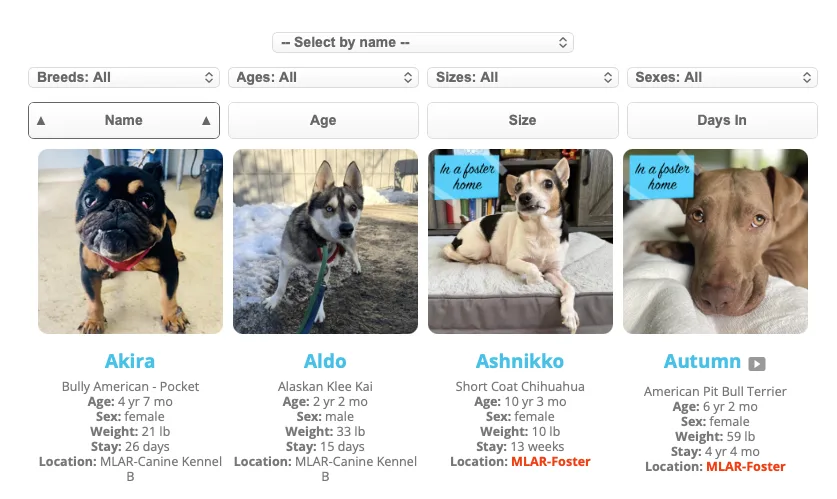
(Filters for breed, age, size, and sex are now available on the list pages)
Version 2.2.1
Version 2.2.1 was released on January 20, 2026.
=== CHANGELOG: ===
Version 2.2.1
1) When Price is shown in the detail page, allow for selection of “Price” or “Adoption Fee” as the label.
2) Cron job scheduling more robust, with locking and re-try
3) Sorting buttons on roster page updated look (better for phones)
4) Cleaned up lightbox effect slightly, images appear larger (if screen size permits) and fewer issues with z-order
Version 2.2
Version 2.2 was released on January 13, 2026.
=== CHANGELOG: ===
Version 2.2
1) Introduction of PetPress Data Manager (premium feature) allowing direct editing of animal information
2) Cron job will retry 5 times if initial scheduling fails.
3) BUG FIX: Detail page was showing “125 years” for PetPoint animals who did not have a declared birthday (as PetPoint defaults birthdays to Jan 1, 1900). Detail page now shows age group or nothing (if no birthdate and no age group)
PetPress Data Manager
It seems that a number of sites downloading PetPress were looking to post animal information without having a back-end system such as PetPoint or AnimalsFirst. From this version, a site will be able to create and edit animal data by using the “PetPress Data Manager” editor within WordPress. This is a premium feature, and is not intended for use in conjunction with a back-end system (as the scheduled updates of the back-end system would clobber any edits made using the Data Manager.)
Cron Job Retries
If you have an external data source (PetPoint, et. al.), there is a wp-cron job which runs periodically to retrieve updates from that data source. Once the update is received, the job re-schedules itself. On rare occasions, the scheduling would fail, and as a result the pet information would never be updated, because the job was never re-scheduled. From version 2.2, the cron job will check for failure, and will attempt to reschedule itself if the initial scheduling is not successful.
Version 2.1.1
Version 2.1.1 was released on December 4, 2025.
Important note for PetFinder users:
PetFinder announced that it is shutting down its API as of December 2, 2025. If the API is shut down then PetPress will no longer function with PetFinder, as there will be no data to display. If you were using PetFinder and PetPress when the API is shut down, you will continue to see the last set of data retrieved.
A future version of PetPress will allow users to manage pet listings without any back-end system. If you are a PetFinder user, contact us to discuss early access to this new feature.
Version 2.1.1
1) PetFinder specific: “Days in shelter” computed from publish date in PetFinder.
2) “Weight” / “Size” label not shown on list page if there is no value for weight or size.
3) Refresh interval for Premium plan is user-selectable. Shortest interval is now five minutes (from 15).
4) “volunteers” report renamed “dataneeds” to more accurately reflect it’s function. The value “volunteers” will continue to function for the forseeable future.
Refresh intervals as short as 5 minutes
With version 2.1.1, premium (paid-plan) users can choose to shorten the refresh interval to as little as 5 minutes. Note that setting the interval to this short risks exceeding the maximum number of requests for your shelter system if you have multiple websites (such as staging sites) or you have a large number of animals in your shelter management software. Please read the note on refresh intervals to learn more.
“Data Needs” report
This report is not new, but was perhaps mislabeled (being called “Volunteers” report for its target audience). The Data Needs report can be used to alert shelter staff and volunteers about which animals on the website could use more data, including more photos, a video, and/or a written description. For those who have implemented this report using its old report name (eg: “report=volunteers”) this will continue to work, but the new name of the report is “data needs” (eg: “report=dataneeds”).
Version 2.1
Version 2.1 was released on October 20, 2025.
Important note for PetPoint users with multiple sites:
Some organizations using PetPoint have more than one site, and use the “site” parameter on the PetPress shortcode to filter results for a specific site. Prior to version 2.1, the site parameter value was the numeric PetPoint site ID. From version 2.1 on, the site parameter must be the literal site name as it appears in PetPoint. So instead of a number such as “3575”, you need to supply a name such as “Springfield”. As before, if you do not specify a site, you will see all animals for the organization.
== Changelog ==
Version 2.1
1) Includes Animals First as a data source option
2) Added ability to purge cache from admin screen (checkbox for “purge data now”) and force refresh of the source data
3) Added robustness so that if the data source is down the website can continue to show the last successful data download until a connection can be re-established.
4) Added option to shorten refresh interval to 15 minutes (premium feature)
5) Added option to include “Stage” on the list page tiles (along with age/weight etc)
6) Added option to show or hide application URL on detail page
7) BUG FIX: On list pages, an appropriate species label is given to the list in messages such as “20 of 40 [species] Shown”, even when more than one species is represented.
8) BUG FIX: removed extraneous /DIV tags on the list page that could potentially interfere with pages that have a sidebar.
9) BUG FIX: Fixed broken detail page links for animals with entirely numeric names.
Animals First
Beginning with Version 2.1, PetPress supports Animals First as a data source option. To use, you will need an authorization key from Animals First so that the plugin can access your data. Note that there is a limit of 250 animals (of all species) in your shelter.
Show Stage on List Page
A new option is the ability to show “stage” on the list page. One requester of this feature also asked about being able to style the stages (eg, to make “Available” green).

If you choose to include “stage” on the list page, the stage will be exactly what it is in PetPoint. (I think this is true for “status” in PetFinder, too, but I’d have to go back to the code to check on that — it’s been a while since I wrote this). Each stage value is accompanied by a CSS class whose name is the letters “ppStage” followed by the exact stage name. Spaces and special characters (except hyphens and underscores) are stripped out. So for example, here are some stages and their respective CSS classes:
- Stage “Available” has the class “ppStageAvailable”
- Stage “Medical Treatment” has the class “ppStageMedicalTreatment” (no space between the words)
- Stage “Needs Spay/Neuter” has the class “ppStageNeedsSpayNeuter” (note the slash is removed)
- Stage “Available – Special Adoption – Med” has the class “ppStageAvailable-SpecialAdoption-Med” (hyphens are not removed)
You will need to determine the class values for your specific stages.
So, if you want to, say, to show “Stage: Available” , you need to include the following in your stylesheet (different WordPress themes have different places for inserting your own CSS, so you will have to find that on your own)
.ppStageAvailable {color:#green}
Don’t forget the “.” at the start of the class name.
(Colors available here: https://www.w3schools.com/cssref/css_colors.php . You’re not limited to colors — any other css attributes such as bold or italics are also supported.)
Version 2.0
NOTE: PetPress Version 2 was released in January 2025. Users using version 1.x can find information for Version 1 here.
Introducting PetPress Version 2
Why Version 2?
PetPress version 2 is a major rewrite of the plugin. This rewrite is necessary so that the plugin has a strong foundation for future enhancements.
Who is Version 2 for?
Version 2 is meant for all PetPress users, but over the three-year history of this plugin, it has become clear that there are two types of users who are interested in the plugin, and this new version is aimed at being the optimal solution for both. These are the small shelter that is looking for a “turn-key” (ready to go out-of-the-box) solution that can be implemented by someone on staff who has only a bare minimum of WordPress skills. The other group is the digital agency hired by shelters to create or manage a website, who may want to modify the look and feel to fit the overall aesthetic of the site.
What is new in Version 2?

Sample tile from version 2.
New Look
For the first time, the structure of the HTML used on the list and detail pages is changing. The basic HTML had not changed in three years, and I have been avoiding making any changes (even fixes) throughout version 1.0 so as to avoid breaking or disrupting any customizations that have been done in anyone’s implementations. However, there were a few small nesting issues (errors, really) in the HTML of version 1 that really needed correction, and this was as good a time as any.
Since the HTML is changing a little, now seemed to be the appropriate time to modernize the look and feel of the plugin. Based on feedback from several users, the look of the list and detail pages are changing somewhat. The new look is a bit more neutral and should blend with most themes fairly easily. For those who want to alter the CSS or even go so far as to change the layout, you will be happy to hear that every element has a class attribute and every data item has a data- attribute, so the new HTML will be as customization-ready as I can make it.
Support for PetFinder
For the first time, PetPress users can opt to use PetFinder as their data source (instead of PetPoint). Although it was my intent to have PetPress look and act the same regardless of the data source, the fact of the matter is that PetPoint and PetFinder contain different data fields, and so complete parity is impossible. For example, PetPoint may contain information on the number of days in shelter, but PetFinder does not. Conversely, vaccination status is a data point that PetFinder can provide that PetPoint does not. Wherever possible, I have endeavored to create the same experience for both PetPoint and PetFinder users.
Days in Shelter
Information on the number of days in shelter is now shown on the list page, and users can sort by it as well. If you do not want to show “days in” information on your site, you can remove this information using the appropriate checkbox on the admin page.
New Premium Reports
Going forward, I plan to add a number of new reports to PetPress. At launch, the first are “Found Animals”, “Featured Pets”, and a Volunteer Report that shows which animals in your shelter need photos, a write-up and/or video. These reports are part of the paid “premium” version of PetPress. At launch, these reports are still very version 1, but that is because just about everything done to date is a core feature that is in the free version. Formerly free features were not moved to the premium tier, so the premium section is something of a green field at launch. Over the course of the next few releases, though, there will be more premium features and the premium features that do exist will be enhanced.
Version 1.9
Note: There is no release 1.9. The version of PetPress that followed 1.8 was a significant re-write of the code base and was given the version number 2.0
Version 1.8
Release date: November 12, 2024.
Version 1.8 of PetPress is largely a maintenance release, but does contain a few noteworthy changes:
1) On the admin screen, it is possible now to set the units of weight to kilograms instead of pounds. This affects the list page (if you have the option set to show exact ages and weights) and the detail page. Note that the selection of pounds or kilograms does nothing to affect the PetPoint data. For example, if a cat is recorded in PetPoint as weighing 10 pounds and you set PetPress to use kilograms, the weight will be displayed as “10 kilograms”. There is no conversion taking place, so it is up to the administrator to use the same units in PetPress as they are using in PetPoint.
2) The DONOTCACHEPAGE directive has been added for pages that include the PetPress shortcode (that is, not the whole site but just the page(s) that show animal info). PetPress has its own caching system and if the shortcode is placed on a page that is cached by another system, updates the the underlying PetPoint data may not appear on the site in a timely way. By design, changes to PetPoint should appear within 30 minutes, but page-level caching may disrupt this. Several prominent caching systems will heed the DONOTCACHEPAGE directive.
In addition, there are two smaller items. One is that there is a new hover effect on the list page, and the other is a bug fix — animals whose weights were less than 3 lb may not have had their weights shown on the site prior to the fix.
Barring any bugs that surface, this is planned to be the final release of PetPress before version 2 launches in Jan/Feb, 2025. For the smoothest upgrade path, it would be best to use the built-in styles of PetPress, and not to override any functions. For more information about version 2, please refer to the version 2 notes (a hyperlink will be provided here when those notes are ready).
History:
Version 1.7
Release date: June 25th, 2024.
Version 1.7 introduces individualized URLs for each animal. Details below. This feature is off by default, but in a future version will be on by default for new installations. Other changes are also noted below.
==Changelog==
Version 1.7
1) New option so that all animals have their own URLs. This is to facilitate social sharing and bookmarking.
2) BUG FIX: Secondary breed now shows alongside primary breed (for animals that have secondary breeds) in the detail pages.
3) New images for when dogs/cats/others are not found (replaces the standard “no photo available” images that PetPoint uses).
Changes in Detail
1) Animal detail pages have distinct URLs. Prior to this version, a detail URL would look something like this:
www.mydomain.com/dogs/?=12345678
With the option in this version, the URL for an animal might look like this:
www.mydomain.com/dogs/pp12345678/fido
This is significant because in some circumstances, such as social sharing and analytics reporting, pages need to have distinct URLs (excluding the querystring parameters, or what comes to the right of the question mark) in order to be regarded as separate pages. Some analytics programs would call all animal detail pages instances of the same page instead of counting them separately by individual.
More importantly, social sharing (and link sharing whenever a “link preview” feature is involved) is facilitated by each detail page having its own URL. For example, with prior versions of this plugin, links shared to Facebook often carried the photo and blurb of the wrong animal, because Facebook would just take the photo and blurb of the first animal shared. With this version, each animal’s correct photo and blurb are represented in the Facebook link.
Use case: Facebook
When sharing links, Facebook creates a “link preview”, using the information found in the OpenGraph data.
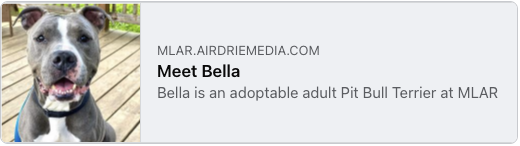
This OpenGraph data is part of the page’s meta data, found in the HEAD of the document. In earlier versions of PetPress, when a page was shared, Facebook would pull up the OpenGraph data for the animal and create the link as expected. However, the next time a user attempted to share a link, Facebook would say “I already know what image and text to use, because someone shared this link before,” and it would use the previously-retrieved image and text. Because the two animals shared one page, Facebook would only fetch the page once to determine the OpenGraph data.
With the option turned on for each animal to have its own detail page, Facebook (and other applications, such as Apple Messages) that have a “link preview” feature, will fetch the correct meta data for each animal.
At this writing, I plan to make this behavior the default instead of an option, but I plan to release it first as an option to see if there is any feedback on compatibility issues with sites.
3) New images for when dogs/cats/others are not found. Prior to this version, if an animal doesn’t have any photos, PetPoint would suppy a generic image of a cartoon animal along with the words “Photo Not Found”. There were two problems with this: one is that the photo had a beige coloring to it and so might not work well with the site color scheme. The second is that the text in the image may appear below the animal’s name in some sites (depending on the sites’ styles).
History:
Version 1.6
On April 16, PetPress version 1.6 was released. This release is unusual in that the appearance of the list pages may change slightly for some users. I make every effort not to change the look and feel for existing users whenever possible, but in this case it was necessary. The explanation of the changes and the reasons for them are detailed below.
First, to recap changes for version 1.5, the current latest version. Most of the changes for version 1.5 were internal, but there were some additions (PetPoint ID and Microchip ID are not fields that can appear on the list page) and once change (Removed separators between age / sex / weight when there is no data to separate).
== Changelog ==
Version 1.6
1) Added option to hide animals that are flagged “on hold”.
2) Animal photos now shown in “lightbox” instead of simple links to the Petango image.
3) Added an option to show adoption application links for those shelters that use PetPoint’s application process.
4) Stylesheet now loaded using WordPress enqueue call instead of being loaded in-line.
5) Removed custom coloring for male/female/unknown from admin settings. Colorization still available by overriding styles.
On Hold Animals
If an animal has its “on hold” flag set in PetPoint, you now have the option of leaving those pets off the lists. Note that by default, every available pet is shown (on hold or not), and you will need to check the checkbox in the admin page to invoke this new behavior. If you are upgrading from a previous version of PetPress, the option will be initially turned off (so your site does not change its behavior).
Photo Lightbox
From this new version, the animal photos will be shown in a Lightbox instead of just loading the photo from Petango.
Adoption Application Links
For shelters that use PetPoint (Petango) to process adoptions, there is now an option to include those application links on the detail pages. Shelters that are not set up to use the PetPoint system for applications should not see the links even if this option is checked, but it is off by default nevertheless, to preserve the existing look and feel for any existing users.
Removed: Accent Colors
Beginning with version 1.6, the ability to set accent colors for male and female animals has been removed from the admin screen. It is still possible to set the accent colors by setting the colors of a.pp_Male , a.pp_Female, and a.pp_Unknown classes in your style sheet.
Stylesheet Loading
Recently, I heard from a few new users that they didn’t seem to be seeing the PetPress styles on their pet pages. I am not sure of the issue (or if there is even just one), but it did prompt me to go back to how stylesheets are loading and switch to a method that is “WordPressy”. This should help elminiate problems in the future with stylesheets and, since stylesheets can be locally cached, might make things a tiny bit faster (though probably not measurably).
Fixing the method of stylesheet loading is, in fact, the reason why the accent color options have gone away. I’m normally reluctant to remove any features or to change how the site works, given the number of users of PetPress, but in this case removing the accent color interface simplifies some things greatly and permits a more orthodox way of loading the main style sheet. I do not have metrics on how many people were using this feature, but anecdotally it seems to be small. Removing this feature seemed worth the opportunity to simplify and remove some sources of potential issues.
Version 1.5
- Cleaned up database tables, reconciled data types
- Added PetPoint ID and Microchip ID as fields that can appear on detail page.
- Removed separators between age / sex / weight when there is no data to separate
Version 1.4
(This post is intended for people who are using and integrating the PetPress plugin, and it is unabashedly geeky in parts. If you’re not a PetPress user, very little of what follows will make sense to you. And that’s OK.)
A not-so-minor update is coming to PetPress in mid-April March. As always, once the new version is released the documentation will be updated, so check there for notes on how to use new features.
Version 1.4 will be released soon. This latest version is being tagged as a full minor version because the data caching model has been completely re-done. The reason for these changes has to do with large shelters and the time costs of loading more than a hundred or so animals at one time.
New features of version 1.4 include:
- Background content loading. The animal details will be loaded from PetPress periodically. In theory, this means that no users should have to wait for the content to load from the remote database.
- Tolerance for PetPoint outages. If the PetPoint service is down when the plugin calls for a data refresh, the old data will continue to be used until service is restored.
- Pagination. Administrators can set the number of animals shown per page of the list, from as few as 12 up to 200 per page.
- New display fields. A number of new fields can be shown on the detail pages, including “no dogs / no cats / no kids”, “Lived with animals / lived with children”, “special needs”, “behavior test results”. Once the update goes live, please refer to the documentation for details.
- Breed name capitalization. The algorithm to “unscramble” breed names has improved capitalization, using the MLA style guide for rules.
Need Help?
I do my best to make the installation and use of this plugin as easy as possible, but PetPoint can be tricky at times. I am available for hire to help with your implementation or, if you’d like a whole new website, I can do that, too! Contact me.
Version 1.3.2
(This post is intended for people who are using and integrating the PetPress plugin, and it is unabashedly geeky in parts.)
A minor update is coming to PetPress in early March. As always, once the new version is released the documentation will be updated, so check there for notes on how to use new features.
- Added all remaining animal types. PetPress now supports all animal types in PetPoint (full list in the documentation).
- Added “Adoption Pending” messages. Animals with adoptions pending will have the “Adoption Pending” sticky on their list tile as well as a message inserted into their bio/write-up on the detail page. This needs to be enabled in the settings and the animal must be in a PetPoint “stage” that begins with the word “Adopted”.
- Secondary breed. In the animal detail page, the breed of the animal is now shown as Primary Breed / Secondary Breed, if a secondary breed is indicated in PetPoint. Note that if the primary breed has “mix” in its name, the secondary breed is suppressed (to avoid labels like “large mixed breed / mix”)
- Accent color flexibility. You can now select the male, female, and gender unknown accent colors from the settings page.
- New shortcode parameter, “showsite”. For multi-site organizations, you now have the option to turn off the site field in settings but enable it selectively using the shortcode parameter “showsite”.
- Facebook sharing. Prior to version 1.3.2, it may have been difficult to create a Facebook post for an individual animal because the list information would appear instead in the post. With this update, the individual animal’s information is included in the post instead (see documentation for details and interoperability issues with SEO plugins).
- Fixed “1003s” bug. Prior to version 1.3.2, using species ID “1003” to show all non-dog/non-cat animals did list animals correctly, but the auto-generated labels for the list (and the footer) used the phrase “1003s” to refer to the animals. Now, the label is “Other Animals” (which is actually a misnomer, but works well for shelters who typically have dogs, cats, and “other”)
- Fixed warning message. Although a non-fatal error, an ugly message would sometimes be shown if the last adoptable animal in a particular site/species is removed from the roster (eg: you have one dog, and it gets adopted) before the cache has been refreshed.
Version 1.3
(This post is intended for people who are using and integrating the PetPress plugin, and it is unabashedly geeky in parts.)
Although version 1.2 is not much more than a week old, it seemed important in light of increased adoption of this plugin to iron out some of the multi-site caching challenges inherent in the design. Initially, there was some denormalization of the PetPoint data done in hopes of speeding up the display of multi-site organizations, but as the plugin matured it became apparent that complete normalization of the data was going to allow for the most stable platform, and given the many different combinations of host platforms, versions of WordPress, themes and theme builders, stability of the platform is of paramount importance. Version 1.3 has full normalization of the data, and in testing seems to perform very well in both single site and multi-site cases. In short, the PetPress data structure looks like the PetPoint data structure now, and that should mean more reliability and fewer changes needed in the future.
Beyond the under-the-hood changes, the following front-end changes are coming in this release. Check the documentation for notes on how to use new features.
- Added Rabbits and Horses as species that can be listed. Springtime is coming and there are already additional rabbits to be found in the shelters near me. In prior versions, only dogs, cats, and “other” were supported, but with the new version rabbits and horses can be selected explicitly.
- Added option to randomize the photos used on the list page. For animals that have more than one photo, a random selection will be made for the list page. The idea behind this is that some people may be re-visiting your website, and perhaps an animal that did not catch the eye could be given a second (or even third) chance.
- Page titles on detail pages list name, species and breed. This was done mostly to improve analytics. Check the documentation for more information on this.
- Removed the auto-generated list headings. The original auto-generated list headings (eg: “Dogs at Rescues-R-Us”) were very problematic for multi-site organizations. Additionally, since the person building the webpage already knows what site(s) is/are going to be represented, it seemed simpler to offer the “heading” shortcode for this purpose.
- The shortcode returns nothing while in the DIVI front-end editor or in admin pages. WordPress tends to want to render the shortcodes any time it finds the, and that can interfere with page editors. My preference would be to have the shortcode interpreted only on display pages. While different page builders work differently (so it’s more a game of whack-a-mole to get them all) I believe I have made some progress by turning off the rendering of the shortcodes for the WordPress admin pages as well as the popular Divi front-end builder.
- Additional CSS fixes. I have gone back and fixed a few inconsistencies in presentation. While things like the selection of breakpoints can be somewhat arbitrary, I have standardized on the iPhone for a mobile device. When viewing lists, one will now see one column of tiles when the iPhone is in portrait mode, and two columns in landscape. As the screen sizes get bigger, the number of columns can increase now to a maximum of five (up from four in version 1.2.1).
Version 1.2
PetPress will be getting an upgrade on or around February 17, 2022. Here’s what’s changing…
Enhancements
New field: Site
Added specifically for the benefit of multi-site organizations, enabling the “Site” field will cause the location (site) of an animal to show on the list page as well as the detail page. Single-site organizations are welcome to use this field, but because there is likely no confusion about where your animals are, it is probably not useful to explicitly show the site for each animal.
New field: Price
The price field will display in the “additional information” section of the detail pages if this field is turned on.
New shortcode parameter: heading
You can set your own list headings using the shortcode parameter “heading” (to replace the auto-generated “Dogs at Rescues-R-Us” a the top of list pages). This is useful in multi-site organizations where PetPress may not select the correct location to show in the heading, or any time you would like to substitute your own heading for the auto-generated one.
Changes to CSS for better layout of list pages
The CSS for version 1.1 and earlier used some fixed values which did not fully utilize the screen width. The new CSS for list pages adjusts the size of the tiles for a better fit.
Fixes
Fix for “double-dogs” — Themify
An issue was discovered for websites using the Themify Builder that resulted in the lists of animals sometimes showing each animal twice. It is unknown if the problem extended beyond the Themify Builder, but hopefully the fix for that conflict is the end of the story.
Fix for overly-long animal names
Animal names longer than 14 characters will show 12 characters plus an ellipsis (“…”) so that the list page layout is not disrupted. The full name will be displayed on the detail page, as there is no space constraint there.
About the Upgrade
Because there is a change to the caching database structure in this upgrade, it is recommended that after the plugin upgrade you “deactivate” and then “activate” the plugin. This action will not clear your configuration information, but it will drop the caching data tables and allow new ones to be built.
More information about the PetPress plugin for PetPoint and WordPress on the PetPress page.
Version 1.1
- Bug fix: Prior to fix, sometimes PetPoint would be called for an individual animal’s record even though there was a cached item recent enough to use instead.
- Added “sort” as a shortcode parameter. Valid values are “age”, “name”, and “weight”. Default sort is by name. Sort parameter in querystring gets precedence over sort parameter in shortcode.
- Added “housetrained” and “on hold” as displayable fields.
- Changed “video” icon from an image to a WordPress dashicon.
- Added test to make sure that “site” parameter is numeric.
- Re-stated minimum WP requirement from 5.8 to 5.7 after testing with 5.7.
Version 1.0
This is the initial production version, supporting data imports from PetPoint.